
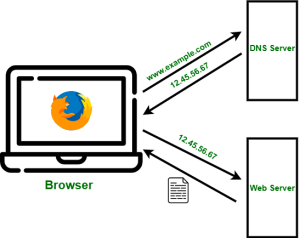
The Domain Name System (DNS) in basic terms is what allows your browser uses to reach a website. Think of it as a Map – with latitudes and longitudes. When you search in google maps for a place, it converts it to a longitude and latitude on the map and shows you a result.
ImageSrc: GeeksforGeeks
The DNS resolver receives a web request, converts it from human readable names e.g. yahoo.com and returns back an IP address i.e. location where the website is hosted. When using the internet from home, you will often rely on your Internet service provider to provide the DNS resolution. There are 2 issues here
- Privacy – your ISP now has a complete dump of your browsing history
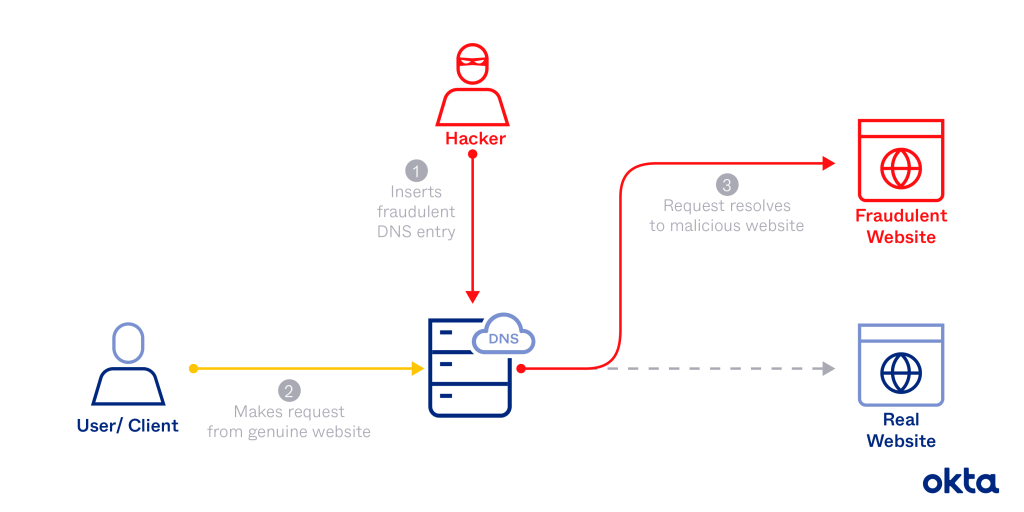
- Security – DNS poisoning. If the DNS server is not secured it can be poisoned to return results that route legitimate requests to illegitimate destinations
ImageSrc: Okta
Simply put, Do not use the default DNS servers provided by your ISP. From a security viewpoint, you have two good options – use the public resolvers provided by Google (primary: 8.8.8.8 / secondary: 8.8.4.4) or Cloudflare (primary: 1.1.1.1 / secondary: 1.0.0.1). Both repuatable companies and they offer fast DNS lookups, support advanced DNS security mechanisms like query minimisation, DNSSEC, DNS over TLS (DoT) and DNS over HTTPS (DoH), and store logs up to 24-48 hours only for troubleshooting and security investigations.
 Security Bytes
Leave a comment