
PXE (Preboot Execution Environment) booting has been a game-changer for me when it comes to managing and deploying operating systems across multiple machines. Instead of manually installing an OS on each system using a USB drive or disk, PXE allows me to boot and load the OS directly from the network, making the whole process much more efficient.
PXE boot process
Generally, a client computer boots from the network by using the PXE protocol according to the following process. It involves three parties, the DHCP server, the PXE server, and the client:
- The client computer broadcasts a DHCP packet that asks for the address of the DHCP and PXE servers.
- The DHCP server responds, sending a broadcast packet that tells the client it’s an address server.
- The PXE server responds to the client and reports that it’s a boot server.
- The client sends a request to the DHCP server to ask for the IP address.
- The DHCP server sends the IP address to the client.
- The client sends a request to the PXE server to ask for the path to the Network Boot Program (NBP).
- The PXE server responds, sending the NBP path.
- The client downloads and runs the NBP.
After this process, the basic PXE boot is completed
Troubleshooting PXE booting using TCP Dump
The following dump is taken on a PXE Server in the lab
- DHCP Server: 192.168.11.147
- PXE Server: 192.168.11.51
- IP Address assigned to the endpoint to be re-imaged – 192.168.11.136
Here is what happens that will help you understand the PXE boot process
- Packet 1382 – Client issues a DHCP Discover broadcast to the network
- Two responses broadcast
- 192.168.11.147 responds that its a Address server and offers IP address 192.168.11.136
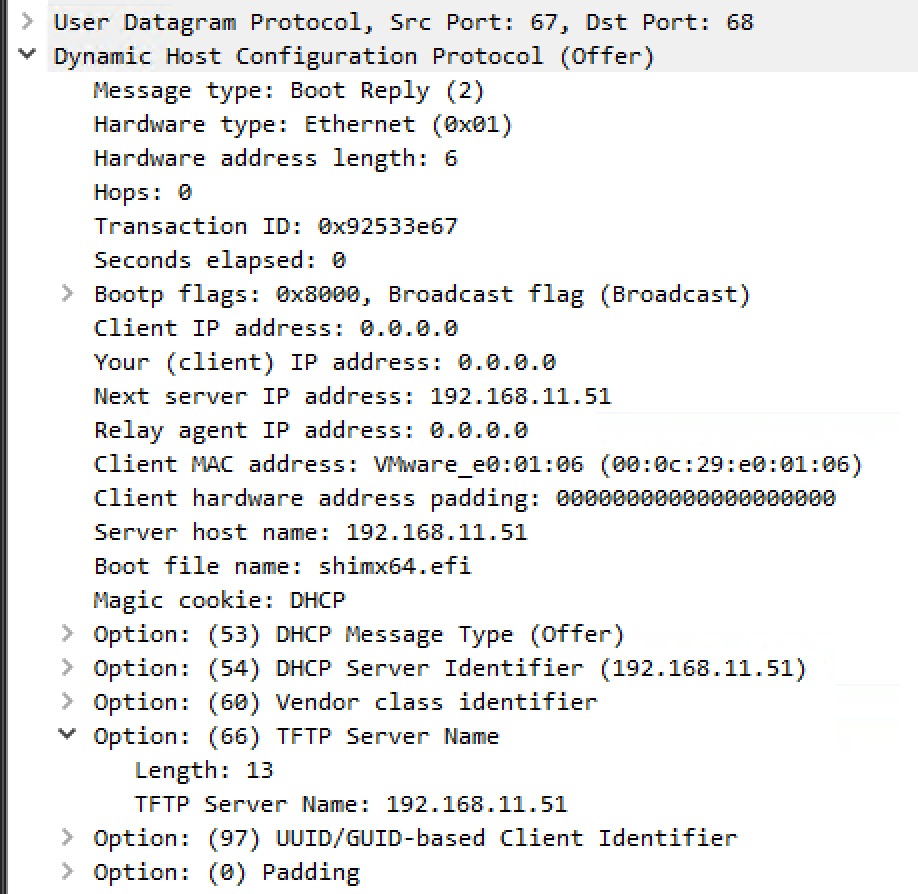
- 192.168.11.51 responds that its a Boot Server and provides the TFTP server Name and Boot File Name
- These responses are critical to the PXE boot process as they assign a DHCP IP to the new endpoint and also let it know where to request the Boot files from
- Packet 1395 – The endpoint requests for IP 192.168.11.136 based on the Offer
- Packet 1397 is the DHCP ACK from the Address Server reserving this IP for the client and returning information like the lease time.
- Packets 1400 and 1401 are the client requesting the Network Boot Path from the PXE server and the response
- Packet 1405 onward you see the protocol change to TFTP and the boot files being downloaded to the endpoint. This example if for a UEFI boot and the subsequent packets will look different for a BIOS boot.

Some other useful screenshots
DHCP Discover Packet and Parameters

DHCP Offers – Address Server response VS Boot Server Response
You can see the different Options returned. The Address server only returns information related to addressing such as IP, Router, DNS, Domain Name etc
while the Boot Server returns data useful for Booting i.e. the Boot File Name and the TFTP server name indicating that its a Boot Server and not an Address Server.
Now its entirely possible that the DHCP server in the network is configured to return the TFTP server information and the Boot File Name. In my lab this is not configured and hence you can see in the first Wireshark screenshot there is no TFTP server information returned by the Address Server

 Security Bytes